How MCP Works: A Complete Guide to Model Context Protocol
A step-by-step guide to how MCP (Model Context Protocol) works: architecture, request workflow, tool discovery, transport methods, and security for AI developers.
How MCP Works: The Complete Guide to Model Context Protocol Architecture
Large language models are remarkably capable at generating text, reasoning through problems, and holding conversations. But they share a fundamental limitation: they cannot see beyond the data they were trained on.
Ask an LLM what happened in your GitHub repository today, and it will either hallucinate an answer or admit it has no access. Ask it to query your production database, and you hit the same wall. The model understands what you want. It simply cannot reach the systems that hold the information.
Model Context Protocol — MCP — exists to solve exactly this gap. It provides a standardized way for AI models to discover, connect to, and interact with external tools and data sources during a conversation.
Understanding how MCP works matters for any developer building AI-powered applications in 2026. The protocol has moved from an Anthropic research project to a vendor-neutral standard under the Linux Foundation's Agentic AI Foundation (AAIF), and adoption is accelerating across Claude, ChatGPT, Gemini, VS Code, Cursor, and dozens of other platforms.
This guide breaks down the complete MCP workflow — from the moment a user types a message to the moment the AI delivers a tool-informed response. You will learn:
- The three core components of MCP architecture
- The eight-step request lifecycle
- How tool discovery works and why it matters
- Transport methods: STDIO, HTTP, and WebSocket
- Error handling, security, and performance patterns
- Common misconceptions that trip up new adopters
What Is MCP in Simple Terms?
Model Context Protocol is an open standard that connects AI models with external tools, data sources, and services through a unified interface.
Think of it like USB for AI applications. Before USB, every peripheral needed its own proprietary connector. You had different cables for printers, scanners, keyboards, and cameras. USB standardized that interface — one protocol, any device.
MCP does the same thing for AI integrations. Instead of building custom connectors between every AI application and every external service, developers build one MCP server per service. Any MCP-compatible AI client can connect to it immediately.
The protocol uses JSON-RPC 2.0 for communication, supports multiple transport layers, and includes built-in mechanisms for capability discovery, authentication, and error handling.
Why AI Needs MCP
Standalone LLMs operate within tight boundaries. They process text, generate responses, and maintain conversation context — but that context only includes what the user has typed and what the model already knows from training.
Several real-world requirements sit outside those boundaries:
- Real-time data access: Stock prices, weather, live dashboards, repository activity
- Private system interaction: Internal databases, CRM records, proprietary documents
- Action execution: Creating tickets, sending messages, deploying code, updating configurations
- Multi-system orchestration: Workflows that span Slack, GitHub, Jira, and cloud infrastructure simultaneously
Before MCP, developers addressed these needs through function calling, plugin systems, or custom API middleware. Each solution required bespoke integration code. A GitHub integration built for Claude would not work with ChatGPT. A Slack connector for one IDE had no portability to another.
Function calling looked like the answer for a while. And it works — for small setups. But the moment you need the same tool logic across multiple AI platforms, or you want a non-technical team member to add a new data source without rewriting application code, function calling starts breaking down. You end up maintaining parallel implementations of the same logic in different formats.
MCP eliminates this duplication. Build one server, connect it to any compliant host. The protocol handles discovery, communication, and response formatting so that developers focus on business logic rather than plumbing.
The Core Architecture of MCP
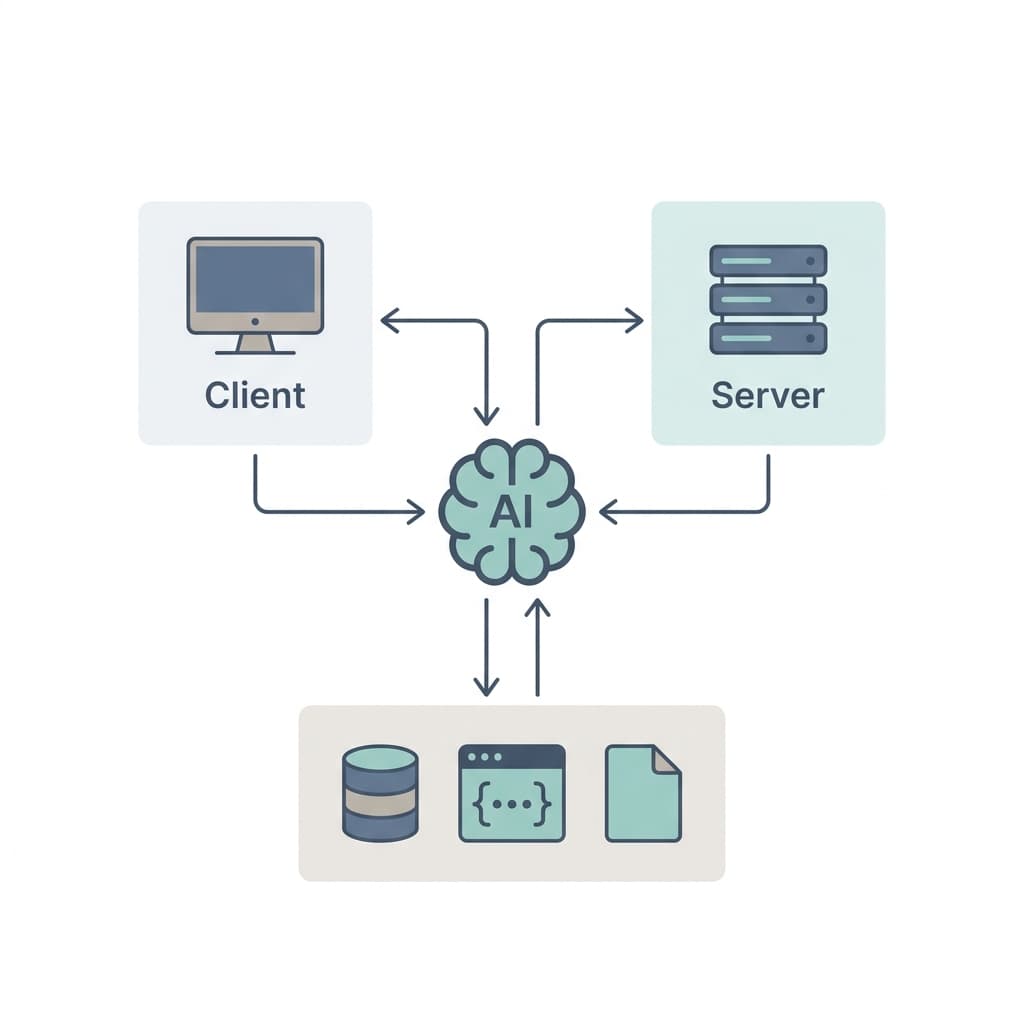
MCP follows a client-host-server architecture with three distinct components. Each has a specific role, and understanding how MCP works begins with understanding how these pieces fit together.
The AI Model (LLM)
The AI model sits at the center of every MCP interaction. It receives user input, interprets intent through natural language processing, and decides whether the request requires external data or tool execution.
When a user asks "What are today's open pull requests?", the model recognizes that answering this question requires access to a code repository — information it does not hold internally. This recognition triggers the MCP workflow.
The model does not call tools directly. It communicates its needs to the MCP client, which handles the actual connection.
The MCP Client
The MCP client is the bridge between the AI model and MCP servers. It lives inside the host application — the IDE, chat interface, or agent framework running the AI model.
Its responsibilities include:
- Maintaining connections to one or more MCP servers
- Discovering capabilities by requesting tool lists, resource descriptions, and available prompts from each connected server
- Formatting requests according to the JSON-RPC 2.0 specification
- Routing responses back to the AI model for interpretation
A single host application can run multiple MCP clients, each connected to a different server. Claude Desktop might simultaneously connect to a GitHub server, a PostgreSQL server, and a filesystem server — giving the AI model access to all three through one unified interface.
The MCP Server
The MCP server is a lightweight program that exposes specific capabilities to the AI ecosystem. It acts as the gateway between the MCP protocol and the actual external service.
One thing worth noting early: an MCP server is not a heavy-weight application server. Most production MCP servers are a few hundred lines of code. The protocol is intentionally thin. If your server is getting complex, you are probably putting too much logic inside it instead of delegating to the underlying service.
Each server exposes three types of primitives:
Tools — executable functions the AI can invoke. A GitHub MCP server might expose tools like search_issues, create_pull_request, or list_repositories. Each tool includes a name, a description, and a JSON schema defining its input parameters.
Resources — read-only data the AI can access. These include files, database records, configuration documents, or API responses. Resources are identified by URIs and can be listed or read by the client.
Prompts — reusable prompt templates that help the AI perform specific tasks consistently. A code review server might expose a prompt template that structures feedback in a standardized format.
The server receives requests, executes the corresponding operation (API call, database query, file read), and returns structured results through the protocol.
How MCP Works: The Complete Workflow
The full MCP request lifecycle involves eight steps. Walking through each one reveals how the protocol transforms a user's natural language request into a tool-informed response.
Step 1 — The User Sends a Request
Everything starts with a user typing a message into an MCP-compatible host application.
Example:
"Summarize today's GitHub pull requests."
At this point, the message enters the AI model's context. The host application manages the conversation state and passes the user's input to the model for processing.
Nothing about this step is unique to MCP. The user interacts with the AI exactly as they would in any chat interface.
Step 2 — The AI Understands the Intent
The AI model processes the message and extracts meaning. For the pull request example, it identifies several things:
- The user wants a summary (output format)
- The data involves GitHub pull requests (external system)
- The timeframe is today (parameter filter)
- The model does not have this information internally
This last point is critical. The model evaluates whether it can answer from its training data and current conversation context. When the answer is no, it determines that external tool usage is required and signals this to the MCP client.
Not every request triggers tool use. If the user asks "What is a pull request?", the model can answer from its training data without invoking any external tools.
A common mistake when building MCP-powered applications is assuming the model will always choose to use tools when you expect it to. It does not. Models are sometimes overconfident in their own knowledge and will answer from training data even when a tool call would produce better results. Writing clear tool descriptions that explicitly state what the tool provides is the single most effective way to improve this behavior. More on that in the tool discovery section.
Step 3 — The MCP Client Discovers Available Tools
Before the AI can select a tool, the MCP client must know what tools exist. This happens through MCP's capability discovery mechanism.
When an MCP client first connects to a server, it sends a tools/list request. The server responds with a complete manifest of its available tools, including:
- Tool names
- Natural language descriptions
- JSON schemas for input parameters
- Required versus optional parameters
For a GitHub MCP server, the discovery response might include tools like:
| Tool Name | Description |
|---|---|
search_issues | Search for issues and pull requests using GitHub's query syntax |
list_pull_requests | List pull requests for a specific repository |
get_pull_request | Get details of a specific pull request by number |
create_issue | Create a new issue in a repository |
The client also discovers available resources (repository metadata, file contents) and prompts (code review templates, commit message generators).
This discovery happens at connection time, not at every request. The client caches the capability list and only refreshes when the server sends a notifications/tools/list_changed notification indicating that its toolset has been updated.
Step 4 — The AI Selects the Best Tool
With the full tool manifest available, the AI model evaluates which tool best matches the user's request.
For "Summarize today's GitHub pull requests," the model examines each tool's description and parameter schema. It selects list_pull_requests because:
- The description matches the intent (listing pull requests)
- The parameters support filtering by date and state
- The response format provides the data needed for a summary
The model also generates the appropriate parameters:
{
  "tool": "list_pull_requests",
  "arguments": {
    "owner": "user-org",
    "repo": "main-project",
    "state": "all",
    "since": "2026-07-09T00:00:00Z"
  }
}
Tool selection is not simple keyword matching. The model reasons about which tool, or combination of tools, will satisfy the request. Sometimes it chains multiple calls — first listing repositories, then querying pull requests across each one.
Here is something that surprises most developers when they first work with MCP: the quality of tool selection depends far more on how you write tool descriptions than on which AI model you use. A mediocre model with excellent tool descriptions will outperform a frontier model with vague ones. Spending thirty minutes rewriting your tool descriptions is almost always a better investment than switching to a more expensive model.
Step 5 — The MCP Client Sends the Tool Request
The MCP client takes the model's tool selection and formats it as a JSON-RPC 2.0 request. This is the actual message sent over the wire to the MCP server.
A typical request looks like this:
{
  "jsonrpc": "2.0",
  "id": 1,
  "method": "tools/call",
  "params": {
    "name": "list_pull_requests",
    "arguments": {
      "owner": "user-org",
      "repo": "main-project",
      "state": "all",
      "since": "2026-07-09T00:00:00Z"
    }
  }
}
Before sending, the client validates the input against the tool's JSON schema. If the model generated invalid parameters — a missing required field, a wrong data type — the client catches this before the request leaves the host.
This validation step prevents malformed requests from reaching the server and wasting round trips.
Step 6 — The MCP Server Executes the Request
The MCP server receives the JSON-RPC request, parses it, and executes the corresponding operation. What happens next depends entirely on the server's implementation:
- API call: The GitHub server translates the MCP request into a GitHub REST or GraphQL API call, authenticates with stored credentials, and retrieves the data
- Database query: A PostgreSQL server converts the request into a SQL query and executes it against the connected database
- File read: A filesystem server reads the requested file from disk and returns its contents
- Business logic: A custom server might run calculations, transformations, or workflow steps defined by the organization
The server handles all authentication, connection management, and error recovery internally. The MCP client does not need to know anything about GitHub's API format, database connection strings, or file system paths.
Step 7 — The MCP Server Returns Structured Data
After executing the operation, the server packages the results into a JSON-RPC response:
{
  "jsonrpc": "2.0",
  "id": 1,
  "result": {
    "content": [
      {
        "type": "text",
        "text": "[{\"number\": 142, \"title\": \"Fix authentication timeout\", \"author\": \"alice\", \"state\": \"open\", \"created_at\": \"2026-07-09T08:30:00Z\"}, {\"number\": 143, \"title\": \"Add rate limiting to API gateway\", \"author\": \"bob\", \"state\": \"merged\", \"created_at\": \"2026-07-09T09:15:00Z\"}]"
      }
    ]
  }
}
If the operation fails, the server returns a structured error instead:
{
  "jsonrpc": "2.0",
  "id": 1,
  "error": {
    "code": -32603,
    "message": "GitHub API rate limit exceeded. Retry after 60 seconds."
  }
}
The structured format ensures that both success and failure cases are predictable. The client never has to guess what happened — it either receives content or a categorized error with a human-readable message.
Step 8 — The AI Generates the Final Response
The MCP client passes the server's response back to the AI model, which now has the external data it needed. The model processes the structured results and produces a natural language response for the user.
For the pull request example, the final response might read:
"You have two pull requests today. PR #142, 'Fix authentication timeout' by Alice, is currently open. PR #143, 'Add rate limiting to API gateway' by Bob, was merged this morning."
The model does more than regurgitate raw data. It interprets the results, applies formatting, adds context, and presents the information in a way that matches the user's original intent — a summary, not a data dump.
The conversation continues naturally from here. The user can ask follow-up questions ("What files did PR #143 change?"), and the MCP workflow repeats for each new tool-dependent request.
Visualizing the MCP Request Flow
The complete lifecycle forms a clear pipeline:
Rendering diagram...
Each stage has a distinct responsibility. The user never interacts with the MCP layer directly. The AI model never talks to external APIs. The MCP server never generates natural language. Clean separation means each component can evolve independently.
Understanding Tool Discovery
What Is Tool Discovery?
Tool discovery is the mechanism that allows MCP clients to learn what capabilities a server offers — automatically, at runtime, without hardcoded configuration.
When a client connects to a server, it sends a tools/list request. The server returns a structured manifest describing every tool it exposes: name, description, input schema, and parameter requirements. The client feeds this information to the AI model so that the model can make informed decisions about which tools to use.
This is fundamentally different from traditional API integrations where the developer must read documentation, understand endpoints, and write client code for each operation. With MCP, the AI model reads tool descriptions the same way a developer reads API docs — but it does so automatically.
The beauty of this approach is also its weakness. Discovery works brilliantly when servers expose 5-15 well-described tools. It starts degrading when a single server dumps 200 tools into the manifest. The AI model has limited context window space, and every tool description consumes tokens. Teams that cram too many tools into one server often see worse tool selection accuracy than teams that split their servers by domain. Keep your servers focused.
Why Tool Discovery Matters
Scalability — Adding a new MCP server to your environment immediately makes its tools available. No code changes in the host application. No model retraining. The client discovers the new tools on the next connection.
Extensibility — Third-party developers can publish MCP servers for their services. Any MCP-compatible host can use them without modification. The ecosystem grows without centralized coordination.
Vendor independence — Because tool descriptions follow a standard schema, switching from one MCP server implementation to another requires zero changes on the client side. The discovery protocol guarantees interoperability.
Dynamic availability — Servers can add, remove, or update tools at runtime and notify connected clients through notifications/tools/list_changed. The AI model always works with the current toolset, not a stale snapshot.
Understanding Resources and Prompts
Resources
Resources represent read-only data that MCP servers expose to the AI model. Unlike tools, which perform actions, resources provide context.
Each resource is identified by a URI and includes a description of its content type. Common examples:
| Resource Type | URI Pattern | Description |
|---|---|---|
| Documentation | docs://api/authentication | API reference for authentication endpoints |
| Configuration | config://app/settings.json | Current application configuration |
| Database record | db://users/profile/12345 | User profile data from the primary database |
| Repository file | repo://main/src/index.ts | Source code from the main branch |
The AI model can request resources to build context before answering a question or executing a tool. If a user asks about a specific configuration setting, the model reads the config resource first, then provides an informed answer.
Prompts
Prompts are reusable templates that MCP servers expose to standardize common tasks. A code review server might expose a prompt template that structures review feedback with categories for security, performance, readability, and correctness.
Prompts accept arguments (like the code to review or the language to use) and return a structured message the AI model can incorporate into its response generation.
The practical benefit is consistency. When multiple developers use the same MCP-powered code review, they get feedback in the same format — regardless of which AI model or host application they use.
MCP Communication Protocol
Request Lifecycle
Every MCP session follows a defined lifecycle:
- Initialize — Client and server perform a handshake, exchanging protocol versions and supported capabilities
- Discover capabilities — Client requests tool lists, resource descriptions, and prompt templates
- Call tools — Client sends tool invocation requests as needed during the conversation
- Receive results — Server returns structured responses for each request
- Close — Session terminates when the host application disconnects
The initialization handshake is where capability negotiation happens. The client announces what features it supports (sampling, roots, notifications), and the server responds with its own feature set. Both sides know what to expect for the duration of the session.
JSON-RPC Communication
MCP uses JSON-RPC 2.0 as its wire protocol. This choice was deliberate and reflects several practical requirements:
Lightweight — JSON-RPC messages are compact text. No binary serialization, no schema compilation, no protocol buffers. Messages are human-readable, easy to debug, and simple to log.
Language agnostic — JSON-RPC has client and server implementations in Python, TypeScript, Go, Rust, Java, C#, and virtually every other language. MCP servers can be written in any language without compatibility concerns.
Standardized — JSON-RPC 2.0 is a well-defined specification with clear rules for requests, responses, errors, and notifications. MCP inherits this stability instead of inventing its own message format.
Bidirectional — Both client and server can initiate messages. The server can push notifications (tool list changes, progress updates) without the client polling.
A typical JSON-RPC exchange in MCP:
→ Client: {"jsonrpc":"2.0","id":1,"method":"tools/list"}
← Server: {"jsonrpc":"2.0","id":1,"result":{"tools":[...]}}

→ Client: {"jsonrpc":"2.0","id":2,"method":"tools/call","params":{...}}
← Server: {"jsonrpc":"2.0","id":2,"result":{"content":[...]}}
MCP Transport Methods
JSON-RPC defines the message format. Transport defines how those messages travel between client and server. MCP supports three transport methods, each suited to different deployment scenarios.
STDIO
STDIO transport uses standard input and output streams. The host application launches the MCP server as a child process. Messages flow through stdin (client to server) and stdout (server to client), while logs go to stderr.
Best for:
- Local desktop applications (Claude Desktop, Cursor, VS Code)
- CLI tools and developer workflows
- Quick prototyping and local development
Advantages:
- Zero network configuration — no ports, no TLS certificates, no DNS
- Lowest possible latency — inter-process communication is measured in microseconds
- Simple deployment — the server is just an executable on the local machine
- Process isolation — the host manages the server lifecycle directly
Limitations:
- Cannot serve remote clients — both processes must run on the same machine
- Single client per server instance — no shared connections
- No built-in reconnection — if the process crashes, the host must restart it
STDIO is the default transport for most local MCP integrations and the recommended starting point for new server development.
STDIO is also wildly underrated for production use in desktop applications. Developers instinctively reach for HTTP because it feels more "production-ready." But if your AI application runs on the user's machine and the MCP server runs on the same machine, STDIO is simpler, faster, and has fewer failure modes. Do not add network complexity when you do not need it.
HTTP (Streamable HTTP)
HTTP transport runs the MCP server as an independent web service. The client connects via standard HTTP requests, with optional Server-Sent Events (SSE) for server-initiated messages.
Best for:
- Cloud-hosted MCP servers
- Remote integrations across networks
- Multi-tenant deployments serving many clients
- Enterprise environments with existing HTTP infrastructure
Advantages:
- Network transparency — clients and servers can run anywhere with network connectivity
- Standard infrastructure — works with load balancers, proxies, API gateways, and monitoring tools
- Multi-client support — one server instance serves multiple clients simultaneously
- Built-in authentication — HTTP headers, OAuth tokens, API keys integrate naturally
Limitations:
- Higher latency than STDIO — network round trips add milliseconds
- TLS configuration required for production — adds operational complexity
- Stateless by default — session management needs explicit implementation
HTTP transport is the standard choice for production deployments and hosted MCP server registries.
WebSocket
WebSocket transport establishes a persistent, full-duplex connection between client and server. Both sides can send messages at any time without waiting for a request-response cycle.
Best for:
- Real-time applications requiring low-latency bidirectional communication
- Streaming responses (progress updates, live data feeds)
- Long-running operations with incremental results
Advantages:
- True bidirectional communication — no polling, no long-polling
- Lower per-message overhead than HTTP — no repeated headers
- Connection persistence — one handshake for the entire session
- Streaming support — natural fit for incremental responses
Limitations:
- More complex infrastructure — WebSocket connections require specific proxy and load balancer configuration
- Connection management overhead — heartbeats, reconnection logic, and state recovery
- Firewall compatibility — some corporate networks restrict WebSocket connections
WebSocket transport is less common than STDIO and HTTP but fills an important niche for real-time and streaming use cases.
WebSocket is not always the best choice for what people think they need it for.
Most teams assume WebSocket is required the moment they hear "real-time" or "streaming." In practice, Streamable HTTP with Server-Sent Events covers over 90% of MCP deployments — including those with streaming responses. WebSocket only becomes genuinely necessary when you need the client to push unsolicited messages to the server during an active stream, which is rare in typical AI workflows. If you are debating between HTTP and WebSocket, start with HTTP. You can always migrate later, and you probably will not need to.
A Real-World Example: AI Assistant Accessing GitHub
Theory is useful. A concrete walkthrough is better. Here is how MCP works when a developer asks an AI assistant to find security issues.
User request:
"Show me all open security issues."
Step 1 — Intent recognition. The AI model parses the request and identifies: the user wants to list (action) open (state filter) issues labeled security (topic filter) from their connected repository.
Step 2 — Tool discovery check. The MCP client already has a cached tool manifest from the connected GitHub MCP server. Available tools include search_issues, list_issues, get_issue, and create_issue.
Step 3 — Tool selection. The model evaluates the available tools. search_issues supports query strings with label filters, making it the best match. The model generates parameters:
{
  "name": "search_issues",
  "arguments": {
    "query": "is:issue is:open label:security repo:user-org/main-project"
  }
}
Step 4 — Request execution. The MCP client sends the tools/call request to the GitHub server. The server translates this into a GitHub Search API call, authenticates with its stored token, and sends the request to GitHub.
Step 5 — Response formatting. GitHub returns matching issues. The MCP server packages them into the standard response format and returns them to the client.
Step 6 — Final answer. The AI model receives the structured issue data and generates a human-readable response:
"There are 3 open security issues:
- #87 — SQL injection vulnerability in search endpoint (Critical, assigned to Alice, opened 2 days ago)
- #92 — Missing CSRF token validation on settings page (High, unassigned, opened yesterday)
- #95 — Dependency vulnerability in lodash 4.17.20 (Medium, assigned to Bob, opened today)
Issue #87 and #92 are unresolved. Would you like me to look at the details of any of these?"
The entire flow — from typing the question to reading the answer — takes seconds. The user never sees JSON-RPC, never knows about tool schemas, and never interacts with the GitHub API directly.
How MCP Handles Errors
Real systems fail. Networks time out. APIs return rate limit errors. Credentials expire. MCP includes structured error handling for every failure mode.
Error handling is where most MCP implementations fall apart in practice. The protocol gives you clean error codes and structured responses. But many server authors treat error handling as an afterthought — they catch exceptions, return a generic -32603, and call it a day. The AI model then tells the user "something went wrong" with no useful context. Specific error messages make specific recovery possible.
Common Error Scenarios
| Scenario | Error Code | Recovery Strategy |
|---|---|---|
| Tool unavailable | -32601 | AI informs user, suggests alternatives |
| Network timeout | -32603 | Client retries with exponential backoff |
| Authentication failure | -32603 | Server returns specific auth error, host prompts re-authentication |
| Invalid parameters | -32602 | Client catches during validation before sending |
| Permission denied | -32603 | AI explains the limitation, suggests escalation |
| Rate limit exceeded | -32603 | Server includes retry-after information |
Graceful Error Recovery
When a tool call fails, the AI model receives the error response just like any other result. A well-designed AI application handles this gracefully:
- The model acknowledges the failure to the user in plain language
- It explains what went wrong (without exposing internal details)
- It suggests alternatives — a different tool, a manual workaround, or a retry
MCP errors are categorized, not opaque. The model can distinguish between "the tool does not exist" and "the tool exists but the request timed out" and respond appropriately for each case.
Performance Considerations
MCP adds a layer between the AI model and external services. That layer introduces latency, and managing that latency matters for production applications.
But here is the thing most performance discussions miss: the MCP protocol layer itself is rarely the bottleneck. JSON-RPC parsing takes microseconds. Even HTTP transport adds only a few milliseconds. The real latency comes from two places — the external service call and the AI model's inference time. Optimizing MCP transport while ignoring slow API calls is like tuning your car's radio antenna to go faster.
Request latency — The MCP round trip includes client-to-server communication, external service calls, and response serialization. STDIO transport minimizes the first component; HTTP adds network latency. The external service call typically dominates total response time.
Caching — Clients cache tool manifests after initial discovery. Servers can cache external API responses when the data supports it. Both reduce redundant round trips. One pattern that works well: cache aggressively at the MCP server level, and use short TTLs (30-60 seconds) for data that changes frequently. The user will not notice 30-second-old data, but they will notice a 2-second wait for every request.
Parallel tool execution — When the AI model determines that multiple independent tools are needed, MCP clients can dispatch requests in parallel rather than sequentially. Fetching GitHub issues and Slack messages simultaneously halves the wall-clock time compared to sequential execution.
Efficient context management — Tool responses consume context window tokens. This is the performance factor that bites hardest in practice. A server that returns 50KB of raw JSON for every query will eat through the model's context window fast, degrading response quality for the rest of the conversation. Well-designed servers return structured, concise data rather than raw API dumps. A GitHub server that returns issue titles, numbers, and states is more efficient than one that returns the complete GitHub API response with every metadata field.
Response optimization — Servers should filter and transform data before returning it. If the user asked about open issues, the server should not return closed issues and let the model filter them. Pre-filtering reduces token consumption and improves response accuracy.
Security in MCP
MCP sits between AI models and external systems that hold sensitive data. Security is not an afterthought — it is built into the protocol's design.
That said, most MCP security incidents in practice do not come from protocol vulnerabilities. They come from overly permissive server configurations. A developer spins up an MCP server for "testing," gives it admin-level API tokens, exposes write operations alongside read operations, and forgets to lock it down before sharing it with the team. The protocol is secure. The question is whether the people deploying servers are disciplined about it.
Authentication — MCP servers authenticate incoming connections using standard mechanisms: API keys, OAuth tokens, or mutual TLS. The protocol does not mandate a specific method, allowing servers to match their organization's existing authentication infrastructure.
Authorization — Beyond authentication, servers enforce authorization policies on a per-tool basis. A read-only user might access list_issues but not delete_repository. Authorization happens at the server level, outside the AI model's control.
Input validation — Every tool defines a JSON schema for its parameters. Clients validate inputs before sending, and servers validate again on receipt. This double validation prevents injection attacks and malformed requests from reaching external services.
Permission boundaries — MCP hosts implement a consent model. Before the AI executes a tool that modifies data (creating an issue, sending a message, deleting a file), the host can require explicit user approval. This prevents the AI from taking destructive actions without oversight.
Secure tool execution — Servers run in their own process space with their own credentials. The AI model never sees API keys, database passwords, or authentication tokens. Credentials stay within the server boundary.
Least privilege principle — Each MCP server should expose only the tools necessary for its purpose. A server designed for reading documentation should not also expose file deletion capabilities. Narrow scope limits the blast radius of any compromise.
Common Misconceptions About MCP
"MCP replaces REST APIs"
MCP does not replace REST, GraphQL, or any other API standard. MCP servers are consumers of these APIs. A GitHub MCP server calls the GitHub REST API internally. MCP standardizes the interface between AI applications and these servers — it does not replace the APIs those servers depend on.
"MCP is an AI model"
MCP is a communication protocol, not an AI model. It does not generate text, understand language, or make decisions. The AI model handles reasoning; MCP handles connectivity. Confusing the two leads to wrong expectations about what the protocol can and cannot do.
"MCP only works with Claude"
Anthropic created MCP, but the protocol is open and vendor-neutral. Since its transition to the Linux Foundation's AAIF, MCP has been adopted by OpenAI, Google, Microsoft, and many others. Claude Desktop, ChatGPT, Gemini, VS Code, Cursor, Windsurf, and numerous agent frameworks all support MCP connections.
"MCP stores conversations forever"
MCP does not store conversation history. The protocol is stateless at the message level — each request-response pair is independent. Conversation context is managed by the AI host application, not by MCP. When the session ends, MCP retains no data about what was discussed or which tools were called.
Best Practices for Developers
Building effective MCP servers requires thoughtful design. These recommendations come from patterns observed in production deployments.
The biggest misconception among new MCP developers is thinking the hard part is the protocol. It is not. JSON-RPC is straightforward. The SDKs handle the plumbing. The hard part is designing tools that the AI model can actually use well. Bad tool design leads to bad tool selection, which leads to wrong answers, which leads to teams blaming MCP when the real problem is their server architecture.
Keep tools focused on one task. A tool called manage_everything is harder for the AI model to use correctly than three tools called create_issue, update_issue, and close_issue. Narrow tools with clear names produce better tool selection.
Return structured outputs. Return data in consistent, predictable formats. Include only the fields relevant to the tool's purpose. The model works better with clean, structured data than with verbose API dumps.
Validate inputs thoroughly. Define strict JSON schemas for every tool parameter. Validate types, ranges, required fields, and string formats. Reject invalid inputs with descriptive error messages before executing any operation.
Design descriptive tool names. The AI model selects tools based on their names and descriptions. search_github_issues_by_label is far more informative than search. Descriptions should explain what the tool does, what it returns, and when to use it.
Handle failures gracefully. Every external API call can fail. Wrap operations in proper error handling and return MCP-formatted error responses with meaningful codes and messages. Never let an unhandled exception crash the server.
Minimize unnecessary context. Every byte returned by a tool consumes tokens in the AI model's context window. Filter data at the server level. If the user asked for issue titles, do not return full issue bodies, comment threads, and event histories.
Log tool execution. Record every tool call, its parameters, execution time, and result status. Logs are essential for debugging, performance monitoring, and security auditing.
Secure every integration. Use environment variables for credentials. Never hardcode API keys. Implement proper authentication on the server's MCP endpoint. Apply least-privilege access to external services.
Frequently Asked Questions
What is the difference between MCP and function calling?
Function calling is a model-level feature where the AI generates structured function calls that your application code executes. MCP is a protocol that standardizes how AI applications connect to external tool servers. Function calling requires you to define and handle each function in your application code. MCP moves tool logic to independent servers that any compatible AI application can use.
Can I build my own MCP server?
Yes. MCP servers can be built in any language that supports JSON-RPC communication. Official SDKs are available for TypeScript and Python, with community SDKs for Go, Rust, Java, C#, and others. A basic MCP server can be built in under 100 lines of code.
How does MCP handle multiple tool calls in one request?
The AI model can determine that multiple tools are needed and the MCP client can dispatch those requests in parallel. The model receives all results and synthesizes a combined response. This happens transparently — the user sees one answer, not multiple tool call results.
Is MCP suitable for production applications?
MCP is actively used in production by Anthropic, OpenAI, Google, and hundreds of enterprise organizations. The protocol includes authentication, error handling, and transport options designed for production reliability. The governance transition to the Linux Foundation's AAIF in late 2025 reinforced its stability as a long-term standard.
What happens if an MCP server goes offline?
The AI model receives a connection error and can inform the user that the requested capability is temporarily unavailable. Well-designed host applications implement retry logic and can fall back to alternative servers or cached data when a primary server is unreachable.
Where MCP Goes From Here
The MCP workflow — discover, select, execute, interpret — is straightforward once you see all the pieces. A user asks a question. The AI model recognizes it needs external data. The MCP client finds the right tool, sends a structured request, and receives a structured response. The model translates raw data into a human answer.
What makes this significant is not any single step. It is the standardization. Before MCP, every AI-to-tool connection was custom. After MCP, that connection is portable, discoverable, and secure by default.
For developers building AI applications, understanding how MCP works is no longer optional knowledge. The protocol has become the de facto integration standard for connecting language models to the outside world. Whether you are building an internal chatbot, an IDE extension, or an autonomous agent system, MCP provides the foundational layer for tool connectivity.
The next step is building. Pick a service your AI application needs to access, write an MCP server for it, and connect it to your host. The protocol handles the rest.
Related
Resources
TypeScript 7.0: Inside the 10x Faster Native Go Compiler
Mastering AI-Assisted Coding: Practical Workflows for 2026

React Compiler: The End of useMemo and useCallback
Cognitive Load in Modern Software Architecture: A Visual Guide